DocsPlatform
AI assistant
What the assistant can prepare, how approvals gate every write, and what it will not do.
The assistant prepares work for you; it does not write to your payroll on its own. Attach spreadsheets, PDFs, or documents, and it prepares actions — humans approve, services execute.
The assistant workspace
Open Agent from the sidebar:
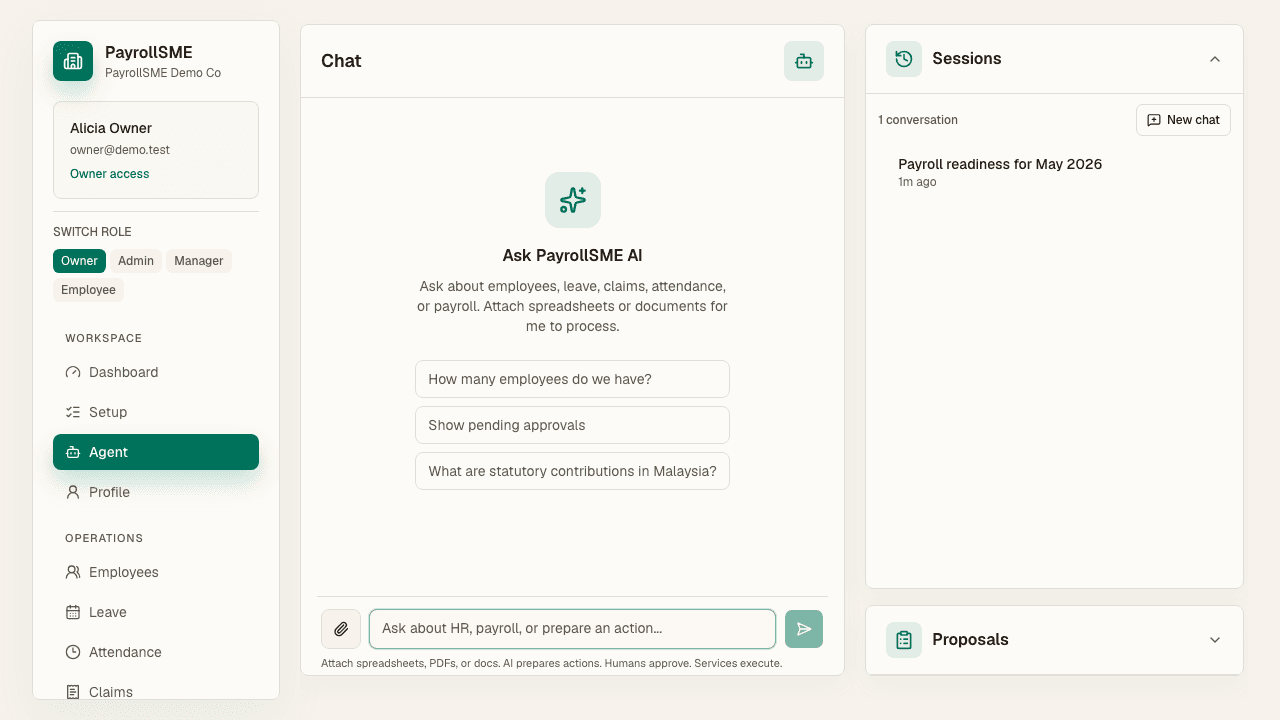
- Chat — ask questions about your workspace and request changes.
- Proposals — actions the assistant has prepared, each waiting for your approval or denial.
- Sessions — your past conversations, resumable at any time.
What it can do
- Answer questions about your workspace using the data it can read.
- Prepare changes such as a salary update and bring them to you for approval.
- Turn uploaded spreadsheets, PDFs, or documents into prepared actions.
- Employee spreadsheet imports land here too: migration drafts are created as agent action proposals, and each needs approval before the employee record exists.
How approvals work
The assistant runs with your permissions, not its own. Every write it prepares appears in Proposals and in the unified Approvals inbox, filterable as Assistant items alongside people-submitted ones. Approve, deny, or request changes; bank details and payroll lock come to you every time, whatever else you have set up.
Automation gates
On /settings#automation, every action has a gate:
| Gate | Meaning |
|---|---|
| Ask me to sign | The assistant prepares the change and you approve it before anything runs. |
| Do it after a hold | The change runs automatically after a hold period. |
| Just do it | The change runs immediately. |
Today every action is Ask me to sign — nothing runs without your signature. Automatic and held actions turn on only once each action can be undone.
What it will not do
- It will not change records without your approval.
- Ask it for something outside your role and it declines the same way the rest of the app would.
- Staff do not have the assistant at all.
Acceptance check
- Ask it to change a salary: it arrives in your inbox, not in your records.
- Ask it for something outside your role: it declines.
- The approvals inbox can filter assistant-originated items separately.