DocsDay to day
Attendance
Import clock data, review exceptions, resolve corrections, and clear payroll-impacting issues.
Attendance feeds payroll inputs. Clock data is imported, anomalies are classified, and corrections are resolved through the approval workflow before payroll lock.
Import clock data
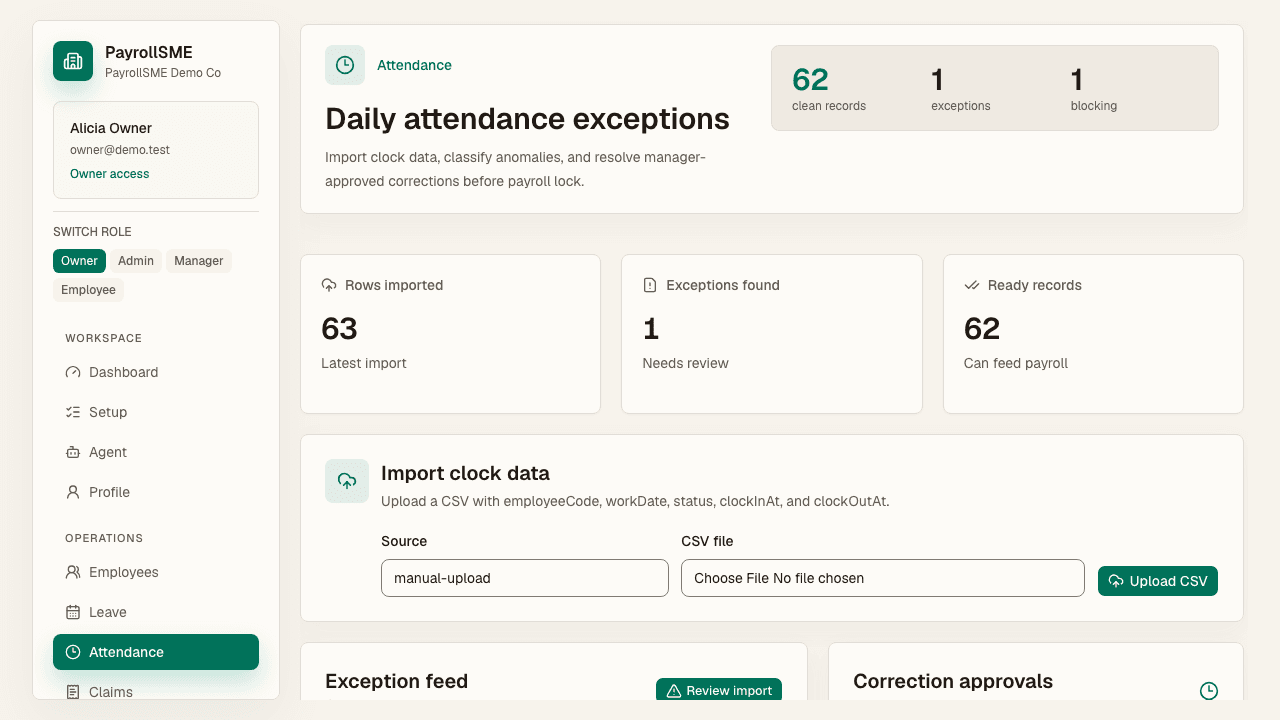
On /attendance, upload clock data as a CSV. The page reports:
- Rows imported — how many records came through.
- Exceptions found — anomalies that need attention.
- Ready records — clean records that flow straight to payroll.
Exception types
Imported rows are classified by type, severity, and payroll impact:
| Type | Severity | Payroll impact |
|---|---|---|
| Missing clock-out | Critical | Blocks daily hours |
| Absent | Critical | Potential unpaid day |
| Late by a few minutes | Warning | Review policy |
Each exception can carry a requested correction — for example a missing clock-out time, or a manager-verified manual attendance from a duty roster.
Resolve corrections
- Corrections arrive as requests in the approval inbox, filterable as Attendance items.
- Review the requester, the original record, and the requested change before deciding.
- Approve, reject, or request changes with a clear decision note.
Payroll impact
- Attendance exceptions with critical severity appear as blockers on
/payrolland must be resolved before lock. - Warning-level exceptions are shown for policy review but do not block the lock gate.
Staff side
Staff can record their own clock times and submit corrections on /me/attendance when a time needs review.
Acceptance check
- The attendance page reports rows imported, exceptions found, and ready records.
- Critical exceptions appear as payroll blockers until resolved.
- Resolved corrections are recorded in the audit trail.