DocsDay to day
Claims and reimbursements
Submit claims with receipts, set category limits, and route reimbursements through approval.
Claims are reimbursement items that can be included in payroll after approval. Approved claims flow into a reimbursement queue, and blocked claims tell you exactly what is missing.
The claims page
On /claims you get:
- Waiting review — how many claims are in the manager approval queue.
- Receipt gaps — claims blocked until a receipt is uploaded.
- Ready for payroll — the total value of approved, receipted claims that can be reimbursed.
- Claim queue — every open claim with its status and reimbursement status.
- Blocked from payroll — claims that cannot be reimbursed yet, each with the reason.
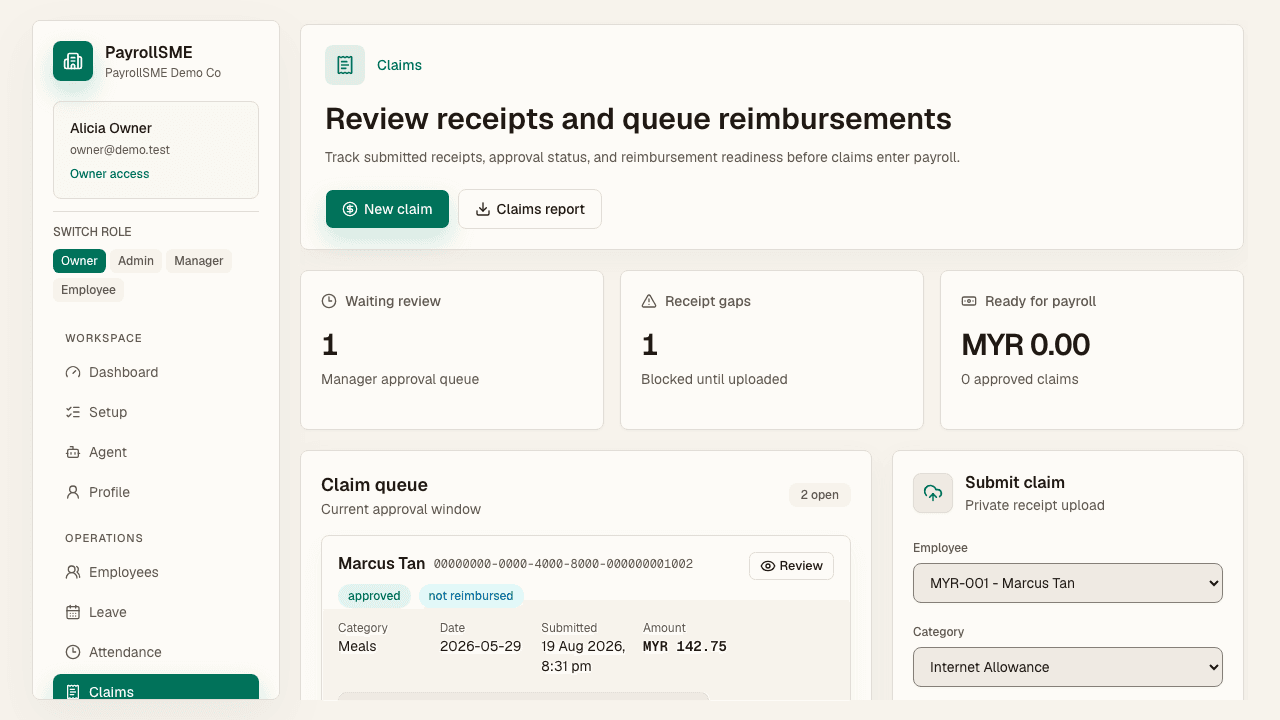
Claim statuses
Each claim carries two statuses:
| Status | What it means |
|---|---|
| draft / pending approval / approved / rejected / cancelled | The approval lifecycle. |
| not reimbursed / queued / reimbursed | Where it is in the reimbursement batch. |
Warnings are surfaced on the queue row — for example Receipt required, Above normal amount, or Same route claimed last week — so a reviewer sees risk signals without opening the claim.
Submit a claim
On /claims (admin) or /me/claims (staff):
- Select the staff member and claim category.
- Enter amount, currency, claim date, and notes.
- Attach a receipt image or PDF when the category requires one.
- Submit. Pending claims can be reviewed or decided from the queue, and cancelled before a decision.
Reimbursement workflow
- Approved claims appear in the reimbursement batch.
- Queue reimbursements to move them into the queued state and into payroll.
- Once paid, mark reimbursed — paid claims leave the payroll blockers.
Claims stay blocked from payroll when they are missing approval, missing a receipt, or not yet queued.
Receipt security
Receipts are stored with a private object ACL, namespaced under the company, and opened through signed read links that expire after 5 minutes. The claims page shows this security state.
Claim categories
Categories are managed on /settings#organization (or the admin panel on /claims): create, edit, activate, deactivate, set monthly and yearly limits, require receipts, and set unusual-amount thresholds.
Acceptance check
- A submitted claim appears in the queue and the approval inbox.
- Receipt gaps and blocked claims explain what is missing and where to fix it.
- Approved, receipted claims queue for reimbursement and reach payroll.